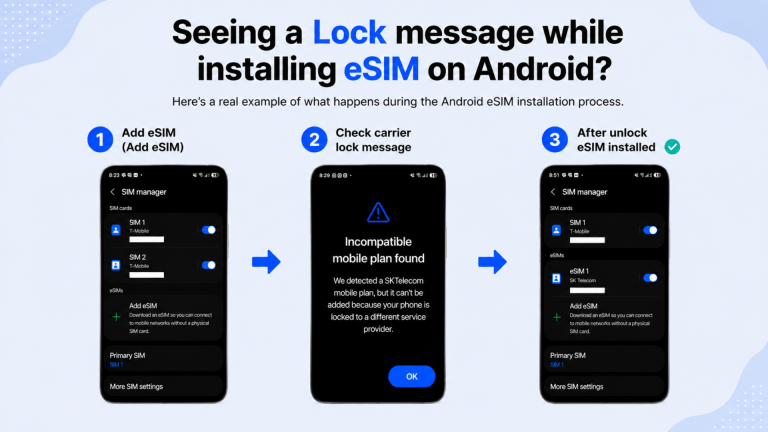
Here is a real case
from an Android customer
who solved a carrier lock issue
during eSIM installation.
If your phone is locked
to a specific carrier,
an eSIM from another carrier
cannot be installed.
However, if there are no issues
such as unpaid device payments
or contract restrictions,
your carrier may be able to unlock the phone.
① Add eSIM
② Check the carrier lock message
③ Contact your current carrier
④ Reinstall the eSIM after unlocking
⑤ Installation completed successfully ✅
If you see a lock message, don’t worry.
Contact your current carrier right away.
✈️ Installing your eSIM
before traveling to Korea
can make your trip much easier.
▶ How to Check Unlock ▶▶▶
📌 One More Tip for Your Trip to Korea!
During your trip to Korea,
Stay connected anytime, anywhere
Use Korean map apps and watch videos freely
Receive reservation and verification text messages
Enjoy fast mobile data speeds
And get online immediately upon arrival in Korea
▶▶▶ Prepare Your Unlimited Data SIM Card
📱 Y CONNECT KOREA SIM Card
✔ Truly unlimited data with no daily usage limit
✔ SK Telecom LTE speeds up to 100 Mbps
✔ Korean 010 phone number included
(with 5 minutes of free outgoing calls)
✈️ If your trip to Korea is confirmed,
Get your Korea SIM card ready today.